







Know Your Security Risks Before Attackers Find Them

How we can help.

Entrust Network’s Cybersecurity Assessment provides an independent review of your IT environment to uncover security gaps, misconfigurations and unnecessary exposure. We turn technical findings into a practical improvement plan that management can understand and act on.

Cybersecurity weaknesses are not always obvious. A single outdated server, exposed administrator account, insecure cloud setting or untested backup could lead to:

    • Data breaches and loss of confidential information
    • Phishing and account compromise
    • Ransomware and business disruption
    • Financial fraud and impersonation scams
    • Regulatory and PDPA compliance concerns
    • Reputational and customer-trust damage

Our assessment helps you identify and address these risks before they become security incidents

We will connect you with the right person.

Share your requirements with us and we’ll get a suitable expert from our team to get back to you.

Complete Assessment Across Your IT Environment

Network and Infrastructure Security

We assess your firewalls, wireless networks, servers, storage systems and network configuration to identify exposure and weaknesses.

Key areas include:

    • Firewall rules and threat-protection policies
    • VPN access and network segmentation
    • Wireless and guest-network security
    • Windows Server and Active Directory
    • Administrator accounts and access permissions
    • Server hardening, patching and security logs
    • NAS storage and shared-folder permissions

Microsoft 365 Security

Microsoft 365 contains your organisation’s email, files, identities and business communications. We assess whether it is securely configured against phishing, account compromise and data leakage.

Key areas include:

    • Multi-Factor Authentication
    • Conditional Access and risky sign-ins
    • Global Administrator and privileged accounts
    • Microsoft Defender for Office 365
    • Safe Links and Safe Attachments
    • Anti-phishing and impersonation protection
    • SPF, DKIM and DMARC
    • SharePoint and OneDrive external sharing
    • Data Loss Prevention and sensitivity labels
    • Audit logs, retention and user offboarding

Microsoft Azure Cloud Security

Cloud security depends on how Azure resources, identities and permissions are configured. We assess your Azure environment for excessive access, exposed services and insecure cloud configurations.

Key areas include:

    • Microsoft Entra ID
    • Role-Based Access Control
    • Privileged Identity Management
    • Network Security Groups and Azure Firewall
    • Virtual networks and network segmentation
    • Virtual machine security and patching
    • Public IP addresses and exposed services
    • Storage-account security and encryption
    • Key Vault and secrets management
    • Microsoft Defender for Cloud
    • Azure Policy, Activity Logs and Log Analytics
    • Azure Backup and Site Recovery

Google Workspace Enterprise Security

We assess Google Workspace to help protect Gmail, Google Drive, user identities and business data.

Key areas include:

    • Multi-Factor Authentication
    • Super Administrator access
    • Context-Aware Access
    • Gmail anti-phishing protection
    • SPF, DKIM and DMARC
    • Google Drive external sharing
    • Data Loss Prevention
    • OAuth and third-party application access
    • Endpoint and mobile-device management
    • Security Centre alerts and audit logs
    • User onboarding and offboarding
    • Backup and data recovery

Endpoint, Backup and Recovery Security

A cyberattack can still cause major disruption if endpoints are unprotected or backups cannot be restored.

We assess:

    • Endpoint Detection and Response
    • Antivirus and anti-ransomware protection
    • Operating-system and application patching
    • Device encryption and administrator access
    • Backup coverage, schedules and retention
    • Immutable and offsite backup protection
    • Recovery Time Objective and Recovery Point Objective
    • Backup restoration and disaster-recovery readiness

Website and Hosting Security

Your website is a public-facing system and a potential target for attackers.

We assess:

    • Website and plugin updates
    • Administrator and hosting access
    • SSL/TLS encryption
    • Web Application Firewall protection
    • Malware and vulnerability exposure
    • Domain and DNS security
    • Website backup and recovery

More Than a Checklist

Our assessment looks beyond technical configurations to evaluate how your people, systems and processes work together. Through site surveys, system reviews and staff interviews, we identify practical security gaps and opportunities for improvement.

We benchmark our recommendations against recognised cybersecurity and data protection standards, including the Personal Data Protection Act (PDPA), Personal Data Protection Commission (PDPC) recommendations, Cyber Security Agency of Singapore (CSA) guidance, and ISO/IEC 27001 information security practices.

WHY US

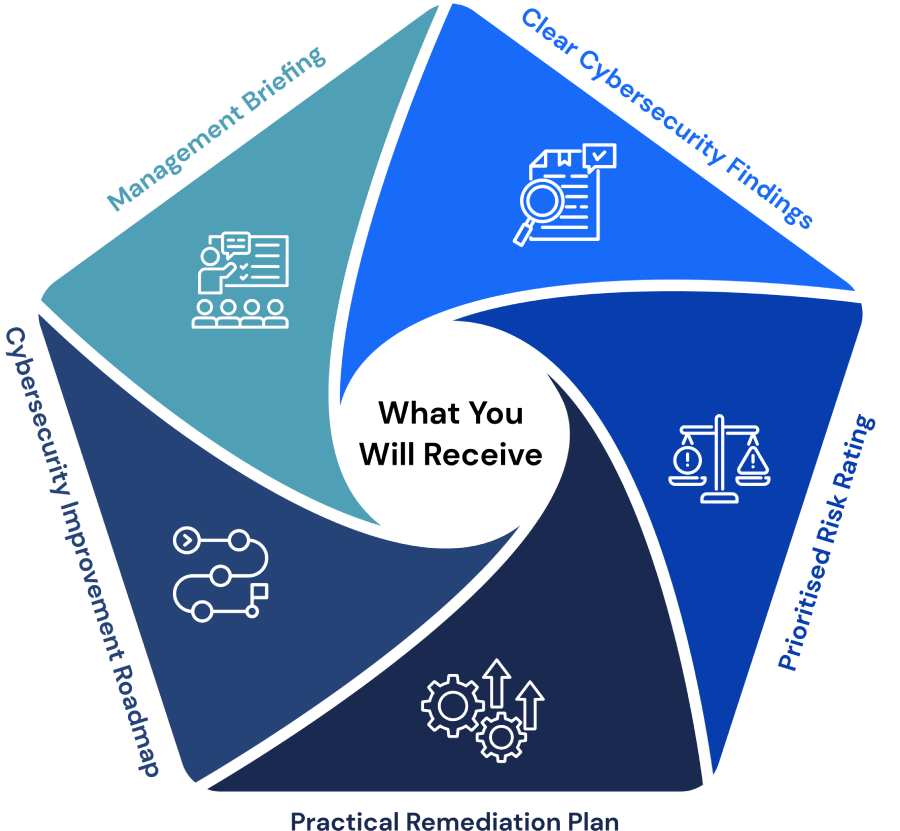
What You Will Receive

Understand your organisation’s security posture, prioritise risks and receive practical recommendations for stronger cybersecurity.

Clear Cybersecurity Findings

Understand where your organisation is exposed and which systems require attention.

Prioritised Risk Rating

Findings are classified according to risk and business impact, helping management focus on the most important issues first.

Practical Remediation Plan

Practical Remediation Plan
Receive clear recommendations to address security gaps, strengthen configurations and reduce risk.

Cybersecurity Improvement Roadmap

Plan your security improvements, IT budget and future compliance initiatives with a structured roadmap.

Management Briefing

We explain the findings in clear business language so management can make informed decisions.

From Assessment to Stronger Protection

Supporting NTUC with robust IT solutions and managed security services for business efficiency.

Assess your current security posture

Identify vulnerabilities, weaknesses and areas that require attention.

Entrust Network achievement represented with number two visual for milestones.

Remediate identified security gaps

Address vulnerabilities and implement practical measures to reduce risk.

Number Three Infographic – Step or Feature Highlight Graphic

Harden systems and cloud configurations

Strengthen system and cloud security through improved configurations and controls.

Highlighting Entrust Network’s milestone and recognition with number four branding element.

Validate improvements through vulnerability assessment and penetration testing

Test security improvements to confirm that identified risks have been effectively addressed.

Key security or service statistic highlighted by Entrust Network

Monitor security events and emerging threats

Stay alert to new threats and security events that could impact your organisation.

Visual displaying Entrust Network’s key service statistics and achievements.

Improve cybersecurity controls continuously

Continuously review and strengthen security controls as threats and business needs evolve.

Why Entrust Network?

Proven Experience

More than 20 years of IT and cybersecurity experience

SME-Focused Expertise

Practical experience supporting SME environments

Technological Approach

Expertise across Microsoft 365, Azure and Google Workspace

Holistic Security

Understanding of cybersecurity, data protection and compliance

Insightful Steps

Independent assessment with clear, actionable recommendations

Support Beyond Assessment

End-to-end support from assessment to remediation and monitoring

Protect Your Business Before an Incident Happens

Do not wait for a cyberattack, data breach or failed audit to reveal your weaknesses.

Contact Entrust Network today to arrange an independent Cybersecurity Assessment and take the next step towards a stronger, more resilient organisation.

ARTICLES

Featured Insights On Technology

How to Setup Google Authentication for Two-Factor Authentication for cPanel Webmail - Entrust Network

How to Setup Google Authentication for Two-Factor Authentication for cPanel Webmail

1. What is Two-Factor Authentication and how does it relate back to cPanel webmail? Two-factor ...

The Benefits of IT Outsourcing: Is It Right for Your Business? - Entrust Network

The Benefits of IT Outsourcing: Is It Right for Your Business?

In the digital age, businesses thrive on technology. But with rapid advancements and growing cyber ...
IT Helpdesk

4 Reasons to Engage IT Helpdesk Services

Businesses and professionals in Singapore are heavily reliant on technology today for various operational needs. ...
Talk to an Expert
Call Us Today